Data / REST API
The map’s aircraft, as JSON
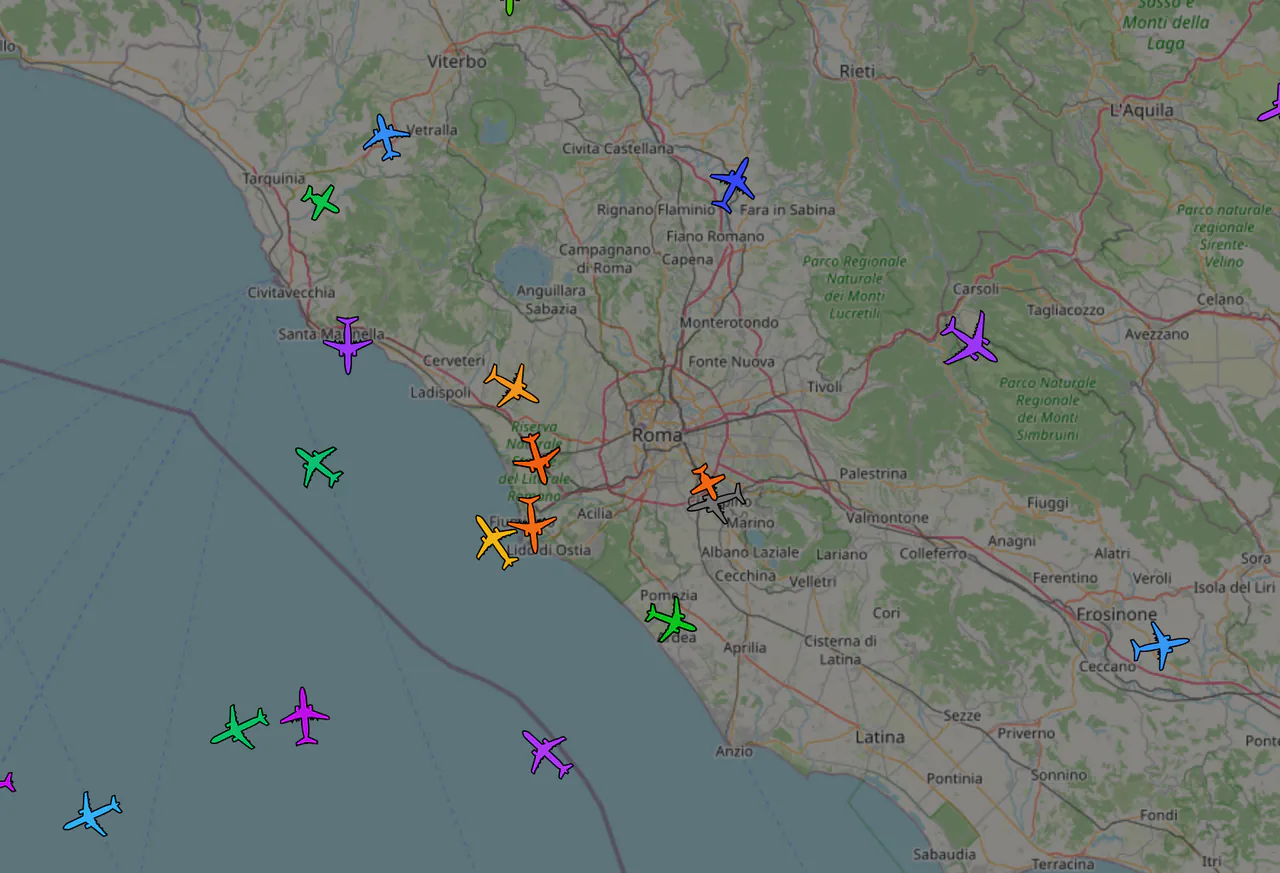
The REST API gives you the same data as the live map: every aircraft the network sees right now, anywhere in the world, with tracks, flight history, overflights of a place, emergencies and notable aircraft. The key is free and arrives in seconds, commercial use included.
Quickstart
-
Get a key
Enter your email in the form below: you get a link that shows the key once. No approval.
-
Make your first request
Every aircraft within 50 km of Rome Fiumicino, with the key in the
X-Api-Keyheader. -
Read the answer
nowin Unix seconds,countandac: one record per aircraft in readsb’s aircraft.json format, the same as tar1090. Altitudes in feet, speeds in knots, radius in km: fields and units. - The same in Python and JavaScript
curl -H "X-Api-Key: YOUR_KEY" \
https://api.flyitalyadsb.com/v2/lat/41.80/lon/12.25/dist/50{
"now": 1792670400.1,
"count": 37,
"ac": [
{ "hex": "4ca7b5", "flight": "RYR42KD ", "r": "EI-ABC", "t": "B738",
"lat": 41.83, "lon": 12.31, "alt_baro": 7225, "gs": 251.4,
"track": 293.1, "squawk": "4361", "seen_pos": 0.6 },
…
]
}Endpoints
Base URL https://api.flyitalyadsb.com/v2: JSON responses and the key in the X-Api-Key header. The full spec is openapi.json, examples in curl, Python, Node.js and ESP32 on GitHub. Coming from ADS-B Exchange? The same data in their format at https://api.flyitalyadsb.com/api/aircraft/v2: change only the host and the key.
Aircraft right now
Documentation| GET/icao/{hex} | |
| GET/callsign/{callsign} | |
| GET/reg/{reg} | |
| GET/lat/{lat}/lon/{lon}/dist/{km} | |
| GET/mil | |
| GET/pia | |
| GET/ladd | |
| GET/sqk/{squawk} | |
| GET/type/{type} |
One aircraft
Documentation| GET/profile/{icao} |
History
Documentation| GET/history/{icao} | |
| GET/history/{icao}/{date} | |
| GET/overflights?lat=&lon=&dist=&from=&to= |
Emergencies, notable aircraft and alerts
Documentation| GET/events?lat=&lon=&dist= | |
| POST/webhooks | paid plans |
Free plan: 30 requests/minute per key, 300,000 a month and a radius up to 500 km, plus 100 requests/minute per IP; paid plans have their own per-key limits, see the plans. Requests without X-Api-Key are rejected at the edge.
Commercial use is allowed on every plan within its limits, inside apps and devices you sell too. Need more, that is reselling the data as an API or feed for others, an SLA, more than 25 aircraft or more volume? Get in touch.
Plans
FlyItalyADSB is a community: the map and the Free plan stay free, commercial use included, within their limits. Paid plans are for heavy API users and help cover the cost of servers and bandwidth, so they include no SLA and no guaranteed response times. Your key never changes: a paid plan raises the limits of the key you already have.
Choose mostly by area: each request asks for the aircraft in a circle, and the maximum radius depends on the plan. For the whole world in one request you need Pro (Fleet includes it). Fleet is for following your own aircraft: an alert at every takeoff and landing, and today’s flights with an estimated arrival time. How it works →
An area up to 500 km: projects, displays, prototypes, commercial too
Includes:
- radiusEach request asks for the aircraft inside a circle: this is the largest circle you can ask for. Docs →: up to 500 km
- flight historyThe flights the network saw, with departure, arrival and times: for example where an aircraft or a flight number flew yesterday. Docs →: 7 days
- tracksAn aircraft’s path point by point, with altitude and speed: to replay a flight on a map. Docs →: last 7 days
- 30 requests/min, 300,000 a month
- commercial useYou can use the data in apps and devices you sell, too. Docs →
- MCP serverTo ask for the data right in the chat with Claude, ChatGPT and other assistants. Docs →
A region up to 1,000 km: small apps and products
Everything in Free, plus:
- radiusEach request asks for the aircraft inside a circle: this is the largest circle you can ask for. Docs →: up to 1,000 km
- flight historyThe flights the network saw, with departure, arrival and times: for example where an aircraft or a flight number flew yesterday. Docs →: 14 days
- tracksAn aircraft’s path point by point, with altitude and speed: to replay a flight on a map. Docs →: last 30 days
- overflightsWhich aircraft flew over a place, for example your house, and when: how far from the place and how many hours per request. Docs →: up to 10 km, 6 h
- emergencies and notable aircraftAircraft that signalled an emergency (squawk 7500, 7600, 7700), military and rare aircraft seen in an area. Docs →: last 24 h
- runway in useWhich runway an airport is using now, estimated from the aircraft taking off and landing. Docs →
- area alertsWe call your server when an emergency or a notable aircraft shows up in an area. Docs →: up to 1
The whole world in one request, no radius limit
Everything in Starter, plus:
- radiusEach request asks for the aircraft inside a circle: this is the largest circle you can ask for. Docs →: the whole world
- flight historyThe flights the network saw, with departure, arrival and times: for example where an aircraft or a flight number flew yesterday. Docs →: 30 days
- tracksAn aircraft’s path point by point, with altitude and speed: to replay a flight on a map. Docs →: last 90 days
- overflightsWhich aircraft flew over a place, for example your house, and when: how far from the place and how many hours per request. Docs →: up to 50 km, 24 h
- emergencies and notable aircraftAircraft that signalled an emergency (squawk 7500, 7600, 7700), military and rare aircraft seen in an area. Docs →: 7 days
- area alertsWe call your server when an emergency or a notable aircraft shows up in an area. Docs →: up to 5
Your aircraft: takeoffs, landings and today’s flights
Everything in Pro, plus:
- watched aircraftYour fleet, by registration or callsign: you follow their takeoffs and landings. Docs →: up to 25
- takeoff and landing alertsA call to your server every time one of your aircraft takes off or lands, wherever it flies. Docs →
- today’s flightsYour aircraft’s flights of the day, with an estimated arrival for those in the air. Docs →
- flight historyThe flights the network saw, with departure, arrival and times: for example where an aircraft or a flight number flew yesterday. Docs →: 90 days
- tracksAn aircraft’s path point by point, with altitude and speed: to replay a flight on a map. Docs →: since 2022
Compare all plans
| Feature | Free | Starter | Pro | Fleet |
|---|---|---|---|---|
| Price and limits | ||||
| Price per month (before tax) | €0 | €9 | €49 | €149 |
| Requests per minute, per key | 30 | 60 | 300 | 300 |
| Requests per month | 300,000 | 1,000,000 | 10,000,000 | 10,000,000 |
| Limit per IP address | 100/min | no | no | no |
| Maximum radius of a request | 500 km | 1,000 km | the world | the world |
| Live data | ||||
| Live positionsevery aircraft the network receives, refreshed every half second; military and MLAT included | yes | yes | yes | yes |
| Aircraft lookupby callsign, registration or ICAO address, up to 50 aircraft in one request | yes | yes | yes | yes |
| Runway in usethe runway an airport is using now, estimated from the aircraft taking off and landing | no | yes | yes | yes |
| Emergencies and notable aircraft: how far backsquawk 7500, 7600 and 7700, military, rare aircraft seen in an area, within the plan’s radius | no | last 24 hours | 7 days | 7 days |
| Flight history and tracks | ||||
| Flight history: how far backthe flights the network saw, with departure, arrival and times; not airline schedules | 7 days | 14 days | 30 days | 90 days |
| Find a flight, flight log as CSVby flight number, callsign or route; one aircraft’s log with its flight hours | yes | yes | yes | yes |
| Tracks: how far backan aircraft’s path point by point (position, altitude, speed), day by day; every day since 17/08/2026, archive from 2022 | last 7 days | last 30 days | last 90 days | since 2022 |
| Overflightsthe aircraft that flew over a place, and when: maximum distance and window of a request | no | 10 km, 6 hours | 50 km, 24 hours | 50 km, 24 hours |
| Alerts and your aircraft | ||||
| Area alertsemergencies and notable aircraft sent to your server as soon as the network sees them (webhooks) | no | 1 | 5 | 5 |
| Watched aircraftyour account’s list of aircraft, for the takeoff and landing alerts | no | no | no | 25 |
| Takeoff and landing alertsa webhook to your server at every takeoff and landing of the watched aircraft | no | no | no | yes |
| Today’s flightsthe day’s flights of an aircraft or a callsign, from takeoffs and landings detected in real time; the arrival is an estimate | no | no | no | yes |
| Integrations | ||||
| MCP server for Claude, ChatGPT and other assistants | yes | yes | yes | yes |
| ADS-B Exchange v2 compatiblesame paths and same fields: change only the host and the key | yes | yes | yes | yes |
| Licence and service | ||||
| Commercial use, also in products you sell | yes | yes | yes | yes |
| Support | ||||
Do you run a receiver that feeds the network?
Pro limits and features for free on your Free keys, for non-commercial use.
The Free plan also has a cap of 100 requests/minute per IP.
More than 25 aircraft, more volume, an SLA or reselling the data as an API or feed: get in touch.
Get an API key
The REST API and the MCP server share the same key, in the X-Api-Key header. Instant and free: enter an email and you get a link that shows the key once (the key itself never travels by email). Requesting again with the same email keeps the old key working until you open the new link, then the new key replaces it: that’s also how to recover a lost key. Already have a key? See its plan and usage, or rotate it, from My API.
Using Claude or ChatGPT?
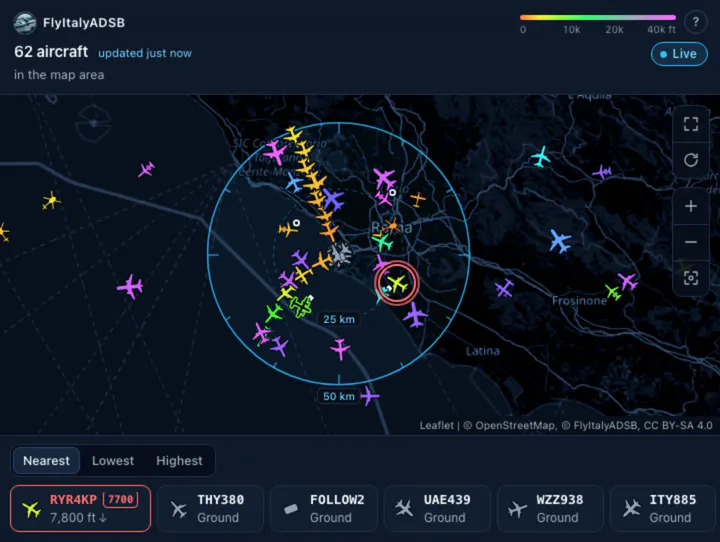
The MCP server gives the same data in the chat: ask which aircraft are over a place and the answer comes with an interactive map in the conversation. Same key and same limits as the REST API.
MCP server and AI agentsFrequently asked questions
Do I need an API key?
Yes, for both the REST API (api.flyitalyadsb.com/v2/*) and the MCP server (flyitalyadsb.com/mcp) — same key for both, passed in the X-Api-Key header. It's self-service and instant: just an email address: within seconds you get a link to see the key, no manual approval. The key is free; paid plans raise its limits without changing it.
What is the difference between flight history and tracks?
Tracks are an aircraft’s path point by point. For the Boeing 737 EI-EGD on 7 November 2026, /v2/history/4ca8af/2026-11-07 returns 4,597 positions, each with time, coordinates, altitude and speed. The flight history is what we build from those tracks every night: for the same aircraft and day, /v2/flights/reg/EI-EGD?from=2026-11-07&to=2026-11-07 returns 7 flights (Bergamo–Tirana, Tirana–Bergamo, Bergamo–Eindhoven and so on), with departure and arrival airport, times and duration. To know where an aircraft was and how high, use the tracks; to know where it took off and where it landed, use the flight history.
What is the flight history?
The flights our network saw, rebuilt every night from the tracks: departure and arrival airport, times and duration. You search it by aircraft (registration or ICAO address, with the flight log as CSV too), by callsign or flight number (where FR5518 flew in the last days and its usual routes), by airport (a day’s departures or arrivals) or by route. How far back depends on the plan: Free 7 days, Starter 14, Pro 30, Fleet 90; it starts on 23 October 2026. These are not airline schedules: no future flights, and if the network did not see a takeoff or a landing that end stays empty.
What are tracks?
An aircraft’s path on one day, point by point: time, position, altitude, speed and heading. /v2/history/{icao} lists the days with a track, /v2/history/{icao}/{date} returns one day’s track, and ?since= returns only the new points of today’s. Use them to replay a flight on a map, find where an aircraft was at a given time, or match it against another recording. Full tracks exist every day since 17/08/2026; for older days, see “How far back do tracks go?”. How far back you can read them depends on the plan: Free the last 7 days, Starter 30, Pro 90, Fleet the whole archive since 2022.
What are watched aircraft and takeoff and landing alerts?
On Fleet your account has a list of aircraft, up to 25: you add them with POST /v2/watch by ICAO address, registration or callsign, or from the chat with the watched_aircraft MCP tool. A webhook with kinds takeoff and landing receives flight.takeoff and flight.landing for each of them, with the airport and the time, wherever it flies. We detect them in real time from our receivers: a takeoff or a landing the network does not see is not sent. For more than 25 aircraft, write to [email protected].
What are today’s flights and the estimated arrival?
The flight history stops at yesterday. On Fleet, /v2/flights/icao, /reg and /callsign add today: the day’s flights so far, from takeoffs and landings detected in real time, each with its status (landed, in flight or unknown). The aircraft does not need to be watched. For an aircraft in flight there is an estimated arrival when its callsign has a usual route leaving from today’s airport: it is the distance divided by the current speed, not a schedule, and while the aircraft climbs it comes out late. The next night the day goes into the flight history.
How do payment and cancellation work?
A monthly subscription paid by card or wallet, prices before tax: your country's tax is added at checkout. Change plan or cancel any time from the links in your receipt; a cancellation takes effect at the end of the period and the key goes back to the Free plan. The data stays CC BY-SA 4.0: a plan pays for access and higher limits, not for a different licence.
Is there an SLA? How fast do you reply?
No plan includes an SLA or guaranteed response times, for the API or for email: FlyItalyADSB is a community and the paid plans only cover the cost of servers and bandwidth. The service is best effort and we reply as soon as we can. An SLA can only be agreed in a tailored agreement: get in touch.
How do I choose a plan?
By area first: each request asks for the aircraft in a circle, and the maximum radius depends on the plan: 500 km on Free, 1,000 km on Starter, the whole world in one request on Pro and Fleet. Then by volume, requests a minute and a month, counted on the key. When you choose a paid plan we tell you if, in the last 7 days, your email’s key asked for more than that plan allows.
Can I use the API commercially?
Yes, on every plan, free included, within that plan's limits. Above the free limits you need a paid plan (Starter from €9/month, Pro, Fleet): self-serve, cancel any time, the key you already have is upgraded in place. You can use it inside apps and devices you sell too (see below). If you need more, that is reselling the data as an API or feed for other people's products, an SLA, more than 25 aircraft or more volume, get in touch and we'll agree something tailored.
Can I put the key in an app or a device I sell? And use it from my server?
Yes. The key can be built into an app or device you distribute or sell, and your server can use it, caching included, to serve your product's users. Requests from all the devices and users count together towards that key's plan: for example 10 devices asking 12 times a minute, day and night, make 120 requests a minute and over 5 million a month, which is the Pro plan. Use one key per product and credit FlyItalyADSB and flyitalyadsb.com in the product (CC BY-SA 4.0). A key inside an app can be extracted: to keep it safe, use it only from your server. To resell the data as an API or feed for other people's products, get in touch.
Where does the data come from?
Almost all of it from the receivers of the FlyItalyADSB network, which send us their data first-hand, and from our own multilateration (MLAT). A small part comes from outside sources: ADSBHub and, for gliders and ultralights, the Open Glider Network (OGN). Aircraft seen only by those sources are about 1% of the total (measured on 19 October 2026): if one of them stops, the rest is unaffected.
How fresh are the positions?
The picture of every aircraft refreshes every half second, on the map and in the API. Each aircraft carries seen_pos, the seconds since its last position: in a measurement on 19 October 2026 half of the positions were under a second old and 9 in 10 under 7 seconds. Positions older than about 60 seconds are not returned.
Which fields does a response have? Is the flight route included?
Each aircraft is a record in readsb's aircraft.json format, the same as tar1090: ICAO hex, callsign (flight), registration (r) and type (t) for about 99% of aircraft, position, altitude, speed, track, squawk, category and the military, PIA and LADD flags. There is no route (departure and arrival airports) and no photos: for those you need another source.
Can I get every aircraft in an area in a single request?
Yes: /v2/lat/<lat>/lon/<lon>/dist/<km> returns every aircraft within the radius. The maximum radius depends on the plan: 500 km on Free, 1000 km on Starter, no limit on Pro and Fleet, which can ask for the whole world in one request. For several specific aircraft one request is enough: /v2/icao/a,b,c (or reg, callsign) looks up to 50 together and counts as one.
Is the network limited to Italy?
No, it is a global network: about 3,200 receivers around the world send their data directly to us, and the REST API and the MCP server answer for any point on the planet. Coverage is densest in North America and Europe: of the receivers that share a position, about 36% are in the United States, 15% in Germany, 11% in the UK and Ireland and another 16% in the rest of Europe (26 October 2026). Asia, Australia and New Zealand follow; Latin America and Africa are thinner. Italy is where the project started, in 2020, and where the name comes from. For a given area, check the live map or try a request with a Free key.
How does this compare to other open ADS-B APIs (adsb.fi, airplanes.live, OpenSky, ADS-B Exchange...)?
The full comparison is at flyitalyadsb.com/data/comparison: features, limits, feeder requirements and commercial-use terms for each, from their public documentation. In short: among those APIs, FlyItalyADSB is the only one that allows commercial use on the free tier; the Pro plan covers the whole world in one request; with the same key you get the FlyItalyADSB format (/v2), the ADS-B Exchange v2 format (/api/aircraft/v2: same paths, key headers and JSON, only the host and the key change), history, events by area and an MCP server for AI assistants.
What are overflights? Can I see which aircraft flew over my house?
Yes: an overflight is an aircraft that passed near a point. /v2/overflights?lat=&lon=&dist=&from=&to= lists the aircraft that passed within dist km of a point in that window, with the time and distance of the closest point, the lowest altitude and the source (ADS-B or MLAT). The current day reaches up to about 10 minutes ago, and the response always says which period it covers. From Starter up, per request: Starter 10 km and 6 hours, Pro and Fleet 50 km and 24 hours; since 17/08/2026. It is about aircraft, not people: we don’t know who was on board.
Can I get a profile of one aircraft, with a photo?
Yes: ask your assistant about an aircraft and it will use aircraft_profile, or call /v2/profile/{icao}: identity, whether we see it now and where, first and last day in the history. The photo isn’t in the answer, because Planespotters.net’s terms don’t allow it: you get the link to their page, with the photographer’s name, and the map link. No photo link for PIA and LADD aircraft. Never owner names.
I run a receiver that feeds the network: do I get anything?
Yes: whoever feeds FlyItalyADSB gets the Pro plan limits and features on their Free keys at no cost (300 requests a minute, 10 million a month, worldwide radius, overflights, emergencies, tracks of the last 90 days and the runway in use; area alerts stay with the paid plans), for non-commercial use. Turn it on in My API by opening the page from the same network as the receiver: we check that data arrives from there, as on the "Is my data arriving?" page. It lasts as long as the receiver feeds the network, with 3 days of grace if it stops.
Documentation
Everything you need to use the API, page by page.
- QuickstartFrom a free key to your first FlyItalyADSB API response in two minutes, with curl, Python and JavaScript.
- AuthenticationAn API key in X-Api-Key, OAuth for AI assistants, and agent registration with auth.md: how to get and manage access to the FlyItalyADSB API.
- EndpointsEvery FlyItalyADSB REST API v2 endpoint: aircraft by hex, callsign or registration (flight numbers too, up to 50 in one request), within a radius or a box, by squawk or type, military, PIA, LADD, tracks, profile, overflights, flight history and today's flights, watched aircraft, the runway in use; list options; differences from ADSBx v2.
- ADS-B Exchange v2 compatibilityUse FlyItalyADSB in place of the ADS-B Exchange v2 API: same paths, same key headers, same JSON (ac, msg, now, total, ctime, ptime). Change the host and the key, nothing else.
- Fields and unitsAn aircraft's fields in the API (readsb aircraft.json) and their units: altitude in feet or "ground", speed in knots, dbFlags, seen_pos, position source.
- Limits and errorsAPI limits per plan (per minute, per month, radius, how far back the flight history goes), how they're counted, the X-FIA-* headers, and what to do about 400-429 errors and Cloudflare blocks.
- Tracks and overflightsADS-B tracks via the API: an aircraft's dates with a track, one day's track, overflights (aircraft that flew over a place), coverage since 2022, and what's missing.
- Alerts, emergencies and your aircraftEmergencies and notable aircraft with /v2/events (emergency squawks, military and rare aircraft by area), the takeoffs and landings of your own aircraft (Fleet), and alerts by signed webhook, checked in Python and JavaScript.
- MCP serverThe MCP server at flyitalyadsb.com/mcp: its tools, “near me”, how to connect Claude, Claude Code and other clients, and how requests are counted.
- Commercial useThe FlyItalyADSB API in apps and devices you sell: one key per product, caching on your server, the right plan, CC BY-SA 4.0 attribution, when to get in touch.
- ChangelogWhat's new in the FlyItalyADSB REST API and MCP server, newest first: endpoints, tools, limits and fixes, each with its date.